Rotozoom Sales Assistant — User Manual
An AI shopping assistant for your WooCommerce store. Sales Assistant is a chat that guides shoppers to the right product. It learns your catalogue through semantic search, answers questions in natural language, and suggests matching accessories to raise the average order value. Pro adds a live human support layer — a full agent console with multi-agent routing, live shopper context, AI reply drafts and automatic translation.
- Free version: AI recommendation chat, semantic catalogue search (up to 5,000 products), domain-agnostic store profile, a one-time trial of 200 AI credits (then top-up packs).
- Pro version: everything in Free plus 500 AI credits per month that renew automatically — with top-up packs available if you need more — AI-generated technical rules, live human support & agent console, live shopper context, auto-translate, Guest AI Search, an industry knowledge pool, AI co-pilot reply drafts, and unlimited catalogue size.
- Pro price: €100 / year per site (incl. VAT).
For newcomers: what this plugin does
Many shoppers don't know exactly which product they need — they know their problem. Sales Assistant adds a chat window where a customer can describe what they want in plain language ("I need a warm-white bulb for a bedside lamp with an E14 socket") and the assistant recommends the right products from your catalogue, explains the difference between options, and suggests the accessories that go with them.
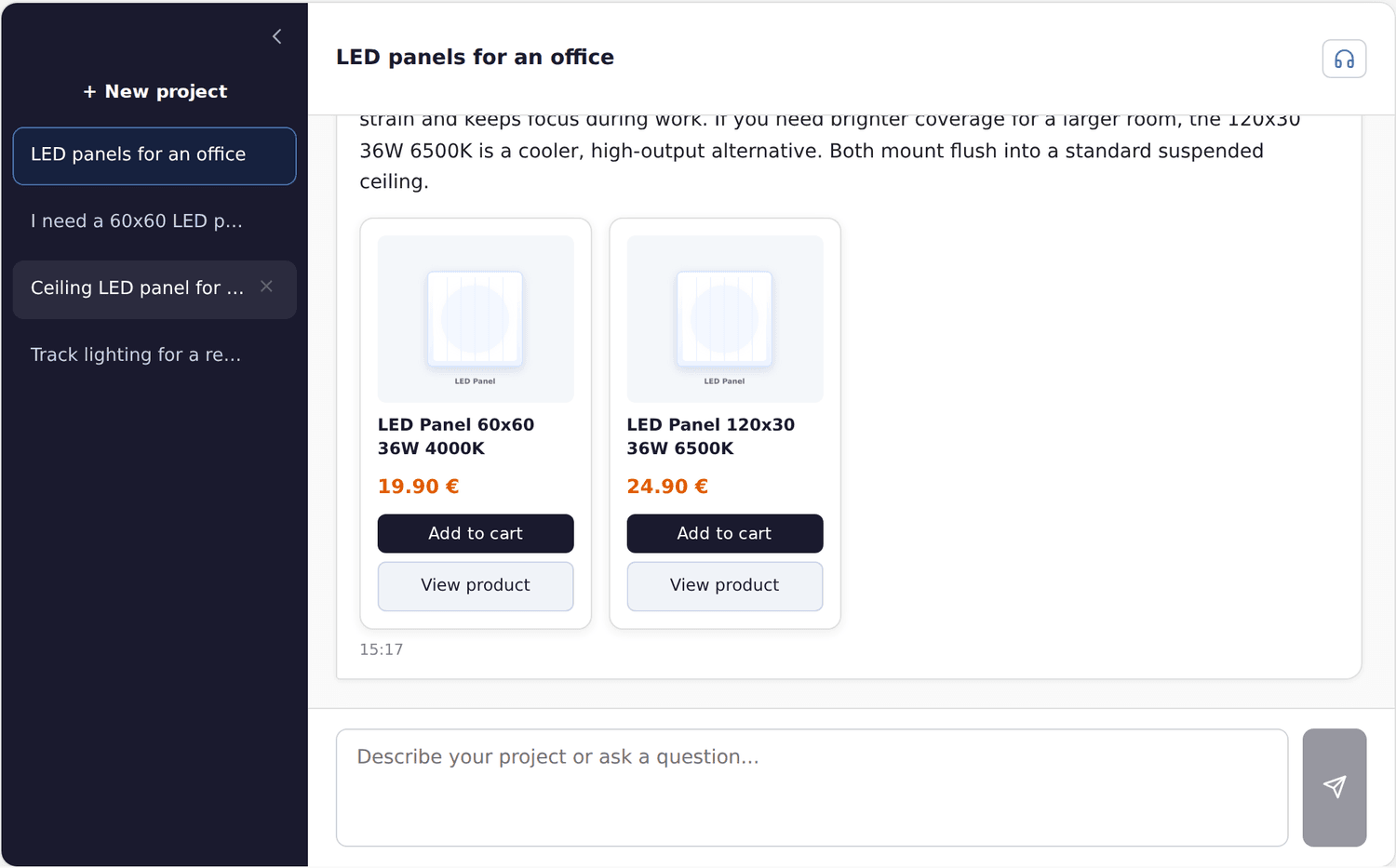
The AI chat understands your catalogue and recommends the right products, with prices and stock.
It runs on Rotozoom's own AI service, which uses several large language models (Google Gemini, GLM and Anthropic Claude) — no AI API key is needed on your site — and it understands your specific store, because it reads your products first.
How it understands your catalogue: semantic search
Ordinary search matches words. If a product is titled "LED panel 60×60" and a customer types "flat ceiling light", a word search finds nothing. Semantic search matches meaning — it understands that the two phrases describe the same thing.
Sales Assistant builds a searchable index of your catalogue using embeddings (numeric representations of meaning). When a shopper asks a question, it finds the products whose meaning best matches the request, then has the AI explain and recommend them. This is why it can find relevant products even when the customer uses completely different words from your product titles.
Setup
1. Build the store profile
The assistant works for any kind of shop ("domain-agnostic"), because it first reads a short store profile describing what you sell and how you want it to behave. Configure this in the plugin settings so the AI's tone and recommendations fit your business.
2. Index your catalogue
Switch on catalogue indexing in the plugin settings so the assistant learns your products — your catalogue is not sent for indexing until you turn it on. After the first build, new and changed products are kept in sync. A larger catalogue takes longer to index the first time.
3. Place the chat
Enable the chat widget so it appears on your storefront. Shoppers open it, ask their question, and receive product recommendations with links.
Feature reference
AI recommendation chat
A conversational window where customers describe their needs and receive specific product suggestions from your catalogue, with explanations. It can also recommend complementary products (cables, mounts, subwoofers, etc.) when an answer implies the customer will need them — which lifts average order value.
Semantic catalogue search
Finds products by meaning rather than exact keywords, so the assistant surfaces the right items even when the shopper's wording differs from your titles and descriptions.
Domain-agnostic store profile
The same plugin works for lighting, audio, fashion or any other niche, because its behaviour is driven by the store profile you provide rather than hard-coded assumptions.
AI credits
Each assistant reply spends exactly one credit — so 1 credit = 1 AI reply. That is how the capacity is measured.
- Free stores get a one-time trial of 200 credits per site. After that they buy top-up packs.
- Pro stores get 500 credits every month, and the allowance renews automatically at the start of each period. Pro can also buy top-up packs whenever it needs more than the monthly allowance.
- Top-up packs (both plans): 200 · 700 · 2,000 credits, purchased once and never expiring.
Credits meter only the AI replies — talking to a human agent (below) never spends them. With Deep reasoning (Pro, see below) enabled, each reply consumes 2 credits.
AI-generated technical rules (Pro)
For technical catalogues, Pro can use a more capable model to generate compatibility and recommendation rules automatically (for example which accessories fit which products), making suggestions more accurate without you writing every rule by hand.
Industry knowledge pool (Pro)
Pro stores can attach an industry-specific knowledge pool so the assistant answers with expertise for your sector, instead of the generic assistant that Free stores use.
Guest AI Search (Pro)
Let visitors who are not logged in chat with the assistant. You choose how many free messages a guest gets before being asked to log in or register (3 by default) and a site-wide daily cap on guest chats (30 by default); you can also add a Cloudflare Turnstile bot check with your own key. Guests can never exhaust your logged-in shoppers' allowance. Great for turning anonymous traffic into guided sales.
Live-streamed replies
The assistant's answer types out in real time in the chat window — shoppers read the reply as it is written instead of watching a waiting animation. On by default, nothing to configure.
Proactive greeting
A small greeting bubble invites the shopper to chat on product and cart pages — it names the exact product being viewed. On desktop it appears after a configurable dwell time or on exit intent; on mobile after half the dwell time or once the visitor scrolls into the page. Tapping the greeting opens the chat pre-seeded with that question and the product's card, and the conversation is saved from there. It shows at most once per visit, dismissing snoozes it for 24 hours, and no AI credits are spent until the shopper actually writes. Configure it in the Widget tab ("Proactive greeting").
Product bundles
When several products belong together as one solution (for example an LED strip, its power supply and a mounting profile), the assistant presents them as a bundle: a titled set of cards with a single "Add the whole set to cart" button. The assistant verifies compatibility (voltage, wattage reserve) before bundling.
Order status in chat
When a logged-in customer asks about their own order ("where is my delivery?"), the chat shows a card with the order's real status from WooCommerce — plus tracking from Rotozoom Sell & Ship when it is installed — so the AI never guesses delivery information. Guests are invited to log in.
Escalations
Two situations are routed out of the chat to your team, each with its own notification e-mail address and an on/off switch (Credits & Limits tab, "Escalations" section):
- Product issue reports (all plans) — a shopper points out a wrong description, photo or price; the store team is e-mailed and the shopper is thanked.
- Complex projects (Pro) — a request that exceeds normal retail (outfitting a whole business, a tender, a bulk order) is routed to your sales team: if a live agent is online the shopper is offered a human chat, otherwise your sales address receives a lead with the conversation context. A three-level trigger sensitivity controls how big a request must be.
Deep reasoning (Pro)
An admin opt-in that makes the assistant think longer before answering — more careful comparisons and pairings at the cost of a noticeably slower reply. A deep-reasoning reply consumes 2 credits instead of 1 (fixed, predictable). If only 1 credit remains, the reply is served without deep reasoning for 1 credit rather than refused.
Assisted revenue
When a shopper clicks a recommended product (or adds it to the cart) and later buys, the order is attributed to the assistant. The Assisted revenue admin tab shows orders and revenue the assistant helped create — over the last 30 days and all-time — so you can see what the plugin earns, not just what it costs. In Pro, the AI assistant also collects its own 1–5 star ratings at the end of consultations and appears in the Agent ranking table alongside your human agents.
Live human support & Agent Console (Pro)
When the AI can't close the sale — or a shopper simply asks for a person — Pro hands the conversation to a live human agent. Your team works from a dedicated, full-screen Support Console on your own site (no wp-admin needed).
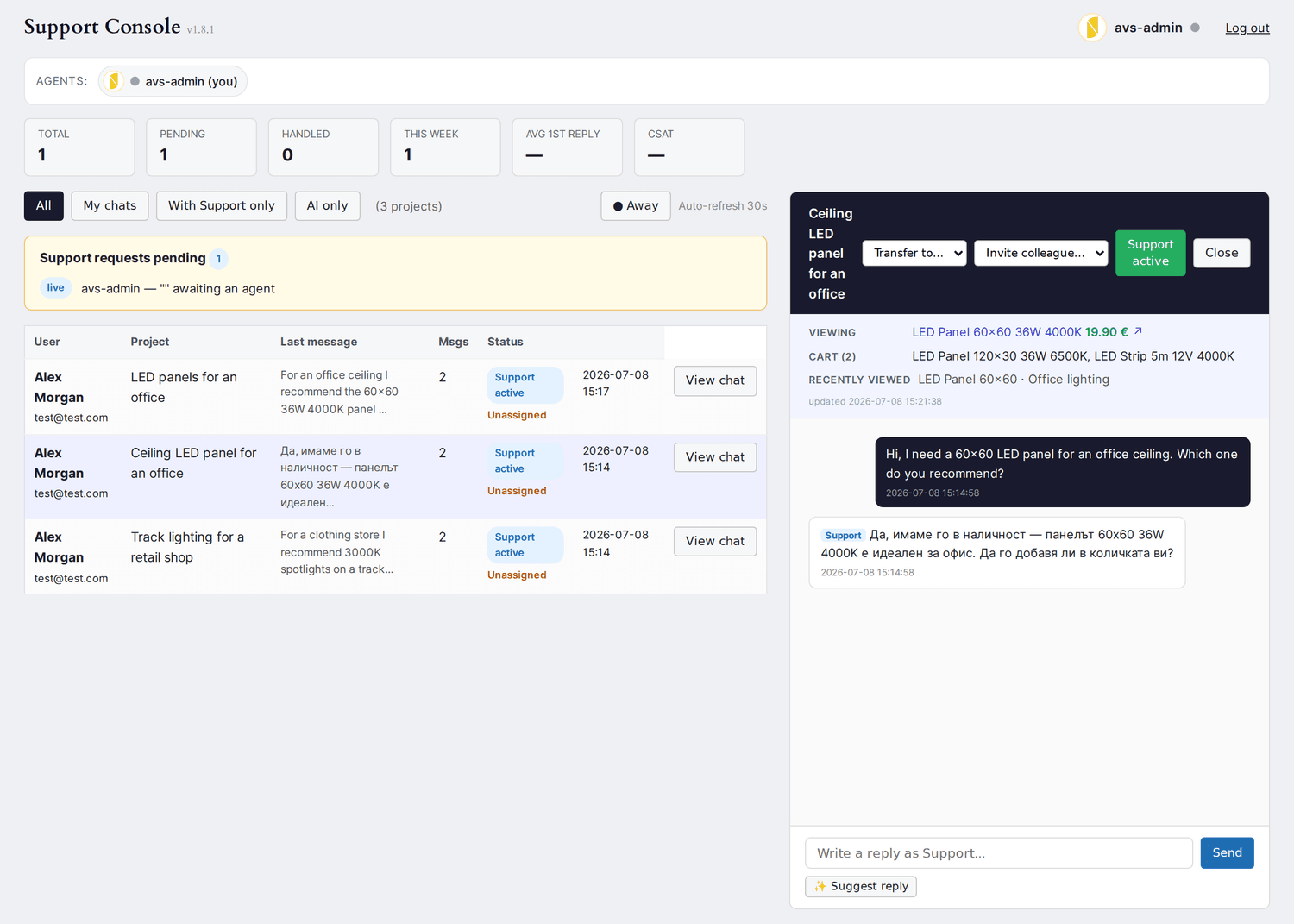
The Pro Support Console — take over a live chat, see what the shopper is browsing, route between agents, and draft replies with AI.
- Take over live — an agent takes control of any conversation; the AI pauses while the human replies.
- Live shopper context — the console shows what the shopper is doing right now: the product they're viewing, their cart, and recently viewed pages — so agents help without asking "which product?".
- Multi-agent desk — several agents work at once: a colleague roster with online/idle status, automatic routing to the least-busy agent, transfer a chat to another agent, or invite a colleague into the conversation. Agent ratings feed a performance leaderboard.
- AI co-pilot — one click drafts a suggested reply from the conversation that the agent can edit and send.
- Credits run out → talk to a human — when AI credits are exhausted and an agent is online, the shopper is offered a live handoff instead of a dead end. The human chat is never limited by AI credits.
- Business hours, canned replies, CSAT — route "Talk to a human" only within your hours, insert saved replies, and collect a 1–5 satisfaction rating after each chat.
Auto-translate live chat (Pro)
During a live human chat the assistant can translate both ways with AI: the shopper reads in their own language and your agent reads in theirs. The agent previews the shopper-language translation before sending, and the shopper sees a 🌐 "translated" badge with a "show original" toggle. Translation never spends the customer's AI credits.
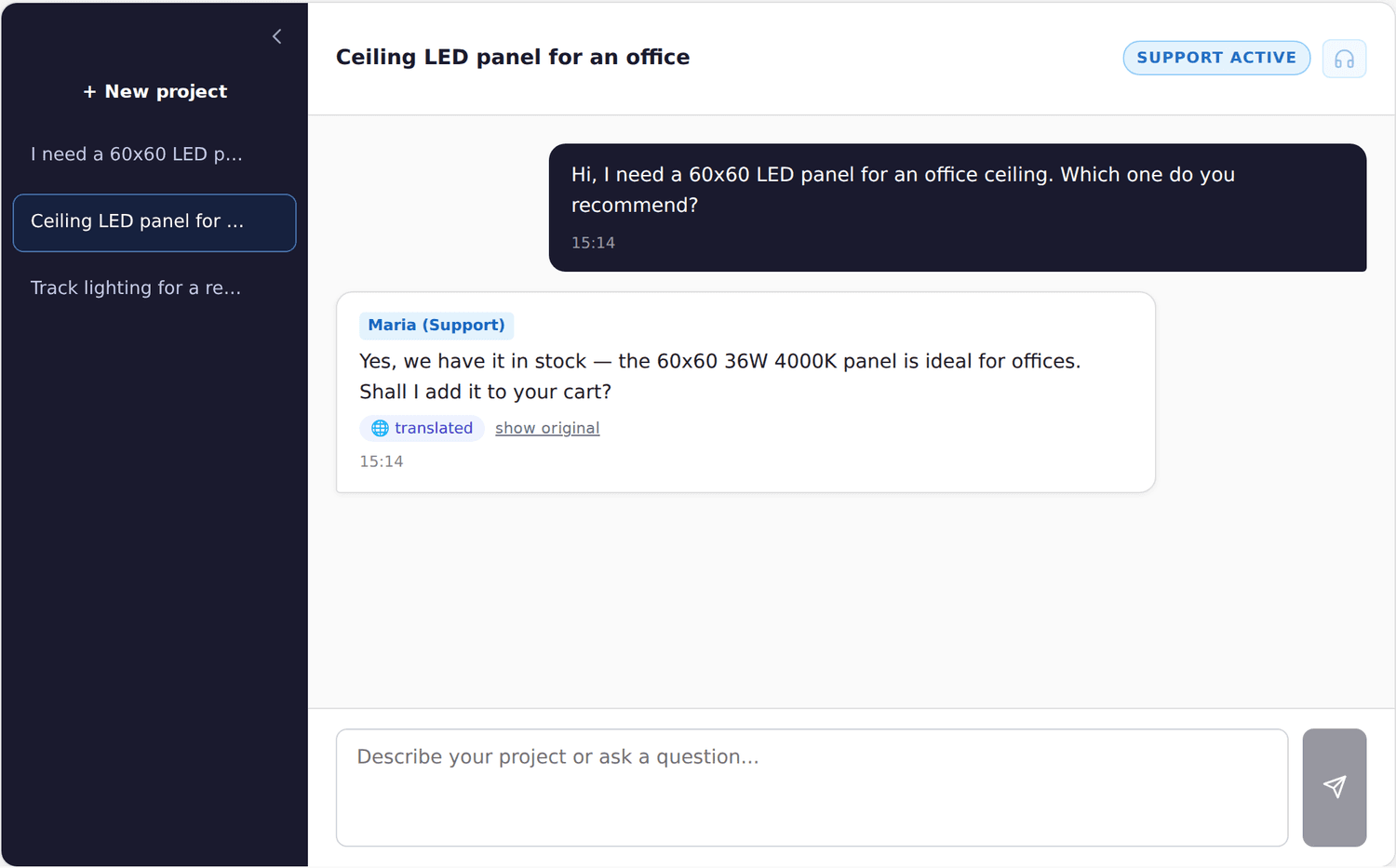
Auto-translate live chat — each side reads their own language, with a translated badge and "show original".
Enable it under the support settings ("Enable auto-translate") and pick your agents' language.
Free vs Pro at a glance
| Feature | Free | Pro |
|---|---|---|
| AI product recommendation chat | ✓ | ✓ |
| Semantic catalogue search | ✓ | ✓ |
| Domain-agnostic store profile | ✓ | ✓ |
| AI credits (1 credit = 1 AI reply) | One-time 200-credit trial, then packs | 500 / month + packs |
| AI-generated technical rules | — | ✓ |
| Live human support & agent console | — | ✓ |
| Live shopper context (browsing + cart) | — | ✓ |
| Auto-translate live chat | — | ✓ |
| Guest AI Search (no login) | — | ✓ |
| Industry-specific knowledge pool | — | ✓ |
| AI co-pilot reply drafts for agents | — | ✓ |
| Live-streamed replies, proactive greeting, bundles, order status | ✓ | ✓ |
| Product issue reports (escalation e-mail) | ✓ | ✓ |
| Complex-project routing to sales | — | ✓ |
| Deep reasoning (2 credits per reply) | — | ✓ |
| Assisted revenue tab | ✓ | ✓ |
| AI in the agent ranking | — | ✓ |
| Catalogue size | Up to 5,000 products | Unlimited |
Advanced notes
- Embeddings pipeline: the catalogue is indexed into embeddings so search matches on meaning; keeping product descriptions accurate and detailed improves recommendation quality.
- Accessory recommendations: when the assistant mentions a needed add-on, it searches the index for a matching product and recommends it — so write clear titles/attributes for accessories too.
- Cost control: credits exist because each AI reply has a real cost; Pro adds a renewing monthly allowance and lets busier stores buy top-up packs. Live human chat is never metered by credits.
Troubleshooting
- The assistant misses obviously relevant products — re-run indexing and improve those products' descriptions and attributes so their meaning is clear.
- Recommendations feel off-brand — refine the store profile to better describe your range and tone.
- Ran out of credits — buy a top-up pack, or (Pro) offer shoppers a live agent; Pro also renews an allowance every month.
- The catalogue limit was reached on Free — Free indexes up to 5,000 products; a larger catalogue gets a 14-day trial, after which it needs Pro (unlimited catalogue size).
Pro needs the rotozoom.com edition of the plugin, which installs Rotozoom Connect automatically; you activate Pro by signing in to your Rotozoom account through Connect — there is no licence key to copy. Pro is tied to one site; move it with "Change site" in your rotozoom.com dashboard. See Installing and updating plugins.
Sales Assistant uses Rotozoom servers, in the free version too. Chat messages, a brief shopping context (viewed product, page titles, cart items) and your product catalogue (once indexing is on) are processed on Rotozoom servers in the EU (Ireland). Replies are generated outside the EU: by Google Gemini, with zero data retention, or as a fallback by GLM or Anthropic Claude in the USA. No shopper names, e-mails, phone numbers or orders are sent. Downloads from rotozoom.com add Rotozoom Connect, which checks rotozoom.com for updates and, after you sign in, sends your site address, site name, and WordPress, PHP, and plugin versions to Rotozoom (EU) for your licence. What is sent and why: Privacy →